
Matomo on the iPhone: your options
You have three ways to read Matomo on an iPhone: the web UI in Safari, a Safari shortcut on your Home Screen, or a native app that talks to the Matomo API. Safari shows every report; a native app is faster for daily glances and adds widgets. Here's how they compare and what a good Matomo app should get right.
Option 1: the Matomo web UI in Safari
Open your Matomo URL and log in. The interface adapts to small screens by collapsing its menus into icons (Matomo explains where they go in this FAQ).
- Good: every report, every plugin, all admin settings. Nothing to install.
- Less good: built for desktops, sessions expire, and you see no numbers until you open Safari.
Option 2: a Home Screen shortcut
From Safari's Share menu you can add Matomo to your Home Screen. It's still the web UI, just one tap closer. Fine if you check Matomo occasionally.
Option 3: a native app
Native apps call the Matomo Reporting API with your auth token and render the data with iOS controls. Matomo's own community app, Matomo Mobile 2, is still available and maintained; independent alternatives include Kestrly, M-Analytics and Statomo. We compare them in Best Matomo apps for iPhone.
What a good Matomo iPhone app needs
A direct line to your server
A big reason to run Matomo is that analytics data stays on infrastructure you control, often in the EU, with no third party in between. An app should keep it that way and talk to your Matomo over HTTPS and nothing else. If an app relays your stats through its vendor's backend, that vendor becomes one more party processing your data, which is exactly what many teams picked Matomo to avoid.
Careful token handling
An auth token carries the rights of its Matomo user. It belongs in the iOS Keychain. Better still, connect with a dedicated user that only has view access to the sites you need, so a lost phone can't change anything. Revoking the token from Matomo cuts the app off instantly; see Matomo's FAQ What if I lose my phone?
Self-hosted and Matomo Cloud
Both expose the same API, so a good app accepts any Matomo URL, including installs in a subfolder. See how to connect Matomo to your iPhone.
Glanceable numbers first
Most mobile checks take ten seconds: visitors today, is the campaign landing, did something break. Realtime visitors and Home Screen widgets matter more than full desktop parity.
Real reports when you need them
Pages, sources, countries, devices and goals with quick period switching. Agencies also want several Matomo accounts and fast switching between clients.
How Statomo does it
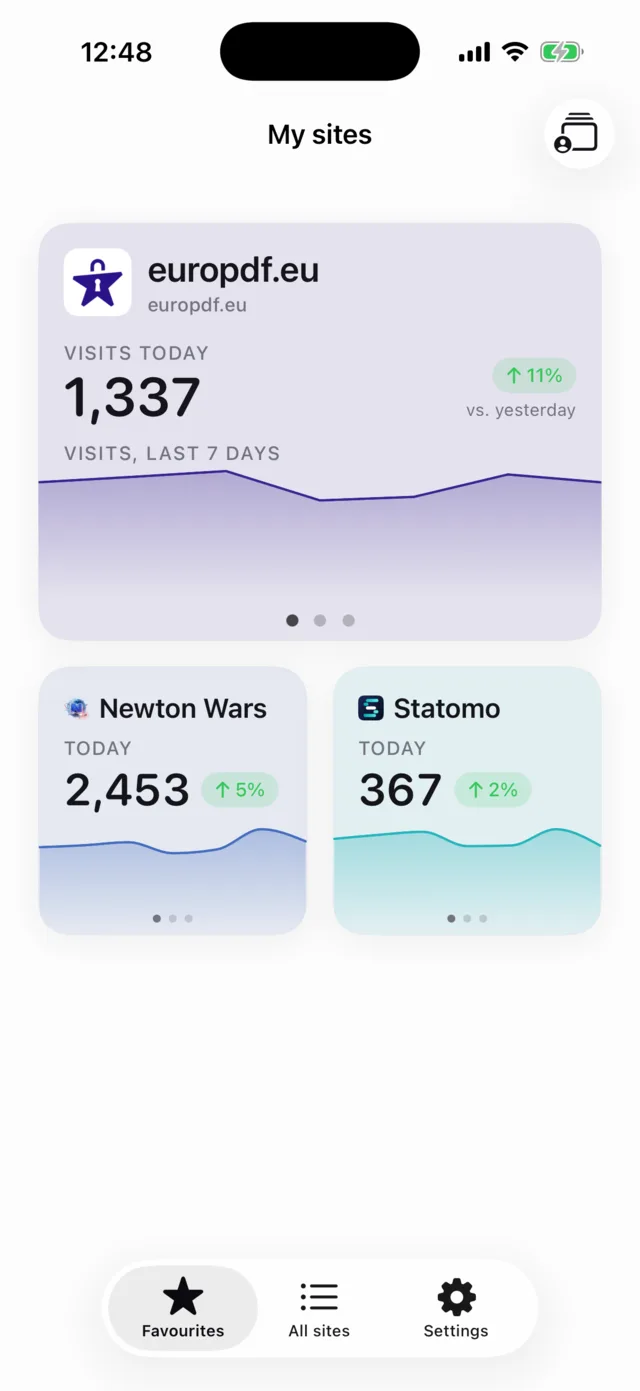
Statomo is a native iPhone app for Matomo, built for iOS 26 by one developer in Vienna and not affiliated with Matomo or InnoCraft. It connects straight to your self-hosted Matomo or Matomo Cloud: no Statomo account, no Statomo server, the token stays in the iOS Keychain, and there are no analytics, ad or crash SDKs (App Store label: "Data Not Collected").
- Free: one Matomo account with all its sites, Favourites tiles with today's number and a sparkline, a realtime map refreshing every 15 seconds, every standard report, small widgets, Dark Mode.
- Pro, once €4.99: full visitor log, segments on any report, unlimited accounts, trend charts, custom date ranges and medium widgets. No subscription, Family Sharing included (pricing).
FAQ
Is there an official Matomo app for iPhone?
Yes. Matomo Mobile 2 is a free community app sponsored by InnoCraft and, as of November 2026, still listed and maintained on the App Store.
Can I use Matomo on my iPhone without an app?
Yes. The web UI works in Safari, and you can add it to the Home Screen.
Does a Matomo app need my password?
Not necessarily. Most apps accept an API auth token instead. See how to create a Matomo auth token.
Does using an app affect GDPR compliance?
An app only reads reports that already exist. If it connects directly to your server, no additional party gets access to your visitors' data. This is not legal advice.
Updated November 2026.