
Matomo segments explained (with examples)
A segment in Matomo is a saved filter that restricts every report to a subset of visits, for example "visitors from Austria on a smartphone". You combine conditions with AND or OR, and Matomo computes the reports from all matching raw visits, unsampled. If a new segment shows no data, it is almost always an archiving question, not a tracking problem.
What a segment is
Segments do not change what Matomo tracks. They filter the raw visit log when reports are built, so every report (pages, referrers, countries, goals) can be viewed for just that group.
Under the hood a segment is a short definition string, the same one you see in API URLs: countryCode==at;deviceType==smartphone. A semicolon means AND, a comma means OR. Knowing this syntax lets you build, share and debug segments quickly.
To create one in the web UI, open the segment selector at the top of any report and add a new segment. Matomo's step-by-step guide: Build custom segments in Matomo.
Real-time vs pre-processed
On Matomo On-Premise a superuser picks how a segment is processed:
- Real time (default): reports are computed when someone opens them. Fine for low traffic and ad-hoc questions, slow on large sites.
- Pre-processed: the archiving cron job computes the segment in the background, so reports open instantly. Use it for segments you look at often.
Why a new segment shows no data
- Pre-processed, and the cron has not run yet. Until
core:archivehas processed the segment there is nothing to show. Wait for the next run or trigger it. - Browser-triggered archiving is enforced off. With
browser_archiving_disabled_enforce = 1inconfig.ini.php, even real-time segments are only processed by cron. - Limited backfill. On-Premise,
process_new_segments_fromcontrols how far back new segments are computed. Matomo Cloud backfills a limited window. Details in the guide linked above. - Raw data already deleted. Segments need raw visit logs. Periods whose raw data you purged cannot be segmented.
8 practical example segments
| Question | Definition |
|---|---|
| Visitors from one country | countryCode==at |
| Mobile only | deviceType==smartphone |
| Organic search traffic | referrerType==search |
| Campaign traffic | referrerType==campaign |
| Returning visitors | visitorType==returning |
| Visits that converted a goal | visitConverted==1 |
| Engaged visits (5+ actions) | actions>=5 |
| Saw the pricing page | pageUrl=@/pricing |
Combine them: deviceType==smartphone;referrerType==search is "mobile search visitors"; countryCode==de,countryCode==at,countryCode==ch is the DACH region. The full list of dimensions is in Matomo's segmentation API reference.
Segments in Statomo (Pro)
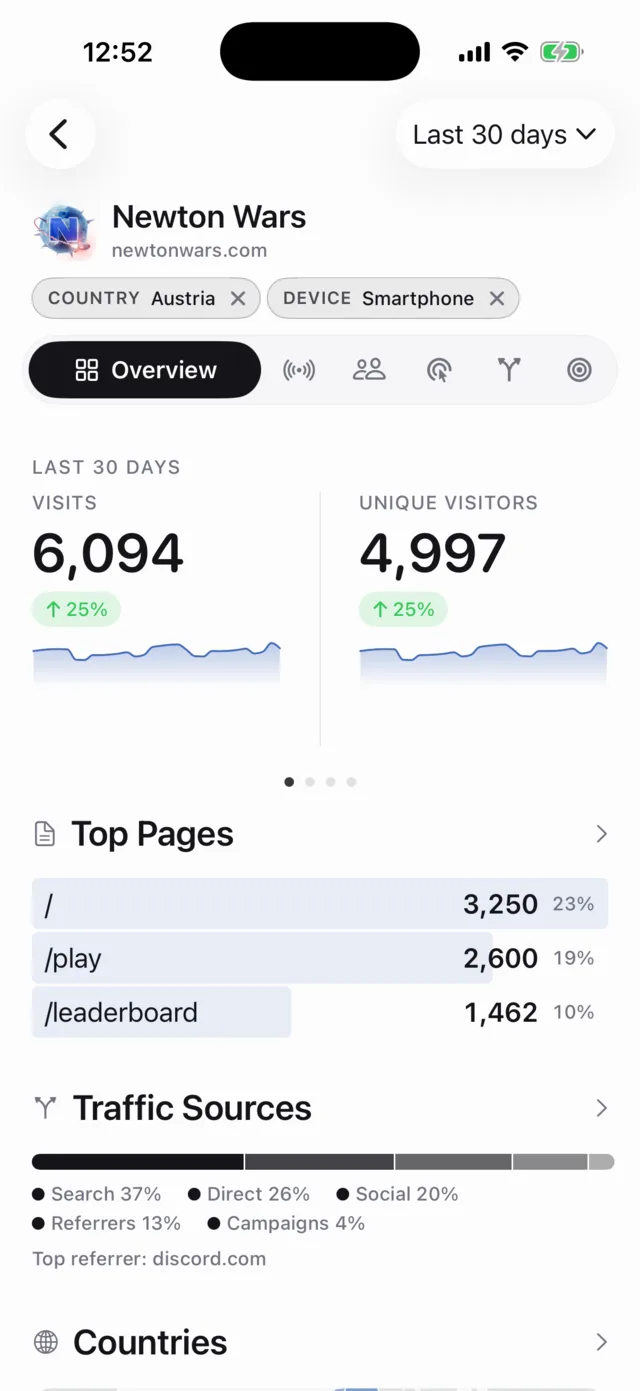
In Statomo, the iPhone app for Matomo, Pro lets you tap a country, device or traffic source in any report to filter the whole site by it, and stack filters, for example Country Austria and Device Smartphone. The filters apply to every report until you remove them. The app talks directly to your Matomo, so the archiving rules above apply: if your server only processes segments by cron, ad-hoc filters from any API client can come back empty.
Related: real-time visitors and Matomo auth tokens.
FAQ
Do segments affect tracking?
No. Segments only filter reports. Visits are tracked the same way whether or not a segment exists.
Can I segment data from before I created the segment?
Yes, as long as the raw visit logs for that period still exist and fall within the backfill window.
Real time or pre-processed?
Pre-processed for segments you check often on busy sites, provided the archiving cron runs regularly. Real time for occasional questions.
Are segment results sampled?
No. Matomo computes segments from all matching raw visits.
Updated November 2026.